Release Notes
Multiple Filter Options
Release date: November 2026
Summary:
Add up to 2 Filter By categories to refine the Data Set sample. In conjunction with Compare By selections, data sets may be refined by 3 layers of filtering.
See it:

What's New:
- Filter list now supports up to 2 categories to make data set sample refinements.
- Selecting 2 filters in addition to a Compare By selection enables up to 3 filters per comparison column.
- Filter selections may be reviewed by hovering over the top Filter chip for an informational tooltip, or by selecting Report Summary from the bottom bar.
Support:
If you have any questions, please contact support at survey@mgma.com.
My Data - Multiple Provider Upload and Download
Release date: November 2026
Summary:
Add multiple providers at once to DataDive My Data Builder with Excel templates. Edit existing entries by downloading your My Data providers to Excel and reuploading with adjustments.
See it:


What's New:
Add New Providers
- Select the Download Blank Template button or link to access the My Data Excel template.
- Enter each provider’s name and specialty. You can also organize providers by Provider ID and Group name.
- Include any of the benchmarks you’d like to rank: Total Compensation, Work RVUs, Collections, Total Encounters, and ASA Units.
Edit Existing Providers
- Select Download My Data to export the providers already loaded in My Data Builder to Excel.
- Make your changes directly in the exported template.
Upload and Review
- Upload either the new provider template or the My Data export to My Data Builder.
- Review the summary of the loaded providers.
- Track upload progress in the notification window at the top right. Your upload remains available until you import it or cancel and clear it.
Support:
If you have any questions, please contact support at survey@mgma.com.
Specialty and Position Blends
Release date: October 2026
Summary:
Create custom specialty or position blends from any data set to combine management, staffing, or specialty roles and build a more robust sample for analysis. Reuse these blends across multiple years within the same data set and in the Pay to Production Plotter.
See it:


What's New:
• Select Edit/Customize Specialties or Edit/Customize Positions in the corresponding carousel to create or edit a blend.
• Choose the specialties or positions to include in your personalized blend, and give your blend a name.
• Select your blends in the specialty or position carousels with the Data Set tables and the Pay to Production Plotter.
• Reuse your blends across multiple years within the data set where it was created.
• View customized blends alongside any selected standard specialties or positions in Data Set tables.
Support:
If you have any questions, please contact support at survey@mgma.com.
Multiple Compare by Selections
Release date: August 2026
Summary:
DataDive now lets you compare multiple data segments across different Compare By categories in the same report. For example, you can view samples based on geographic region, support staff levels, total medical revenue, or organization ownership side-by-side. This makes it easier to identify differences across the groups that matter to your analysis.
See it:

What's New:
- Select multiple options across categories in the Compare By carousel, including All Practices, to view the selected samples side-by-side in one report.
- Apply Filters to further refine the samples selected through Compare By.
- Customize Percentiles and Measures for the selected Compare By samples.
- Access Show Trends at the top of the Compare By carousel to view previous years of data more efficiently.
Support:
If you have any questions, please contact support at survey@mgma.com.
Pay to Production Plotter Enhancements
Release date: July 2026
Summary:
The Pay to Production Plotter in DataDive has been enhanced to make provider compensation and productivity analysis easier, including the ability to load your providers directly onto the chart.
What changed:
- Provider Data and the Pay to Production Plotter are now accessible directly from the DataDive landing page
- Use the drop-down menu to move between DataDive Tools and Data Tables.
- Plot provider compensation against ASA units, collections, or Work RVUs, with optional filters for deeper analysis.
Notes:
As part of survey participation, MGMA has loaded provider information into upgraded DataDive for participants.
See it:

DataDive Tools: My Data Builder, Provider Report Card, Pay to Production Plotter
For data support, email survey@mgma.com. To add the Pay to Production Plotter to your DataDive account, contact sales@mgma.com.
Provider Report Card Enhancements
Provider Report Card Enhancements
Release Date: January 2026
Summary:
The Provider Report Card in DataDive has been enhanced to simplify provider comparisons and clearly show the difference between provider data and MGMA benchmarks.
What Changed:
- Provider Data and the Provider Report Card are now accessible directly from the DataDive landing page
- Provider ranking against MGMA benchmarks has been streamlined; filters are optional for deeper analysis
- The report card clearly displays the difference between provider compensation/productivity metrics and MGMA benchmarks
Notes:
As part of survey participation, MGMA can load provider information into upgraded DataDive on a participant’s behalf.
See It:
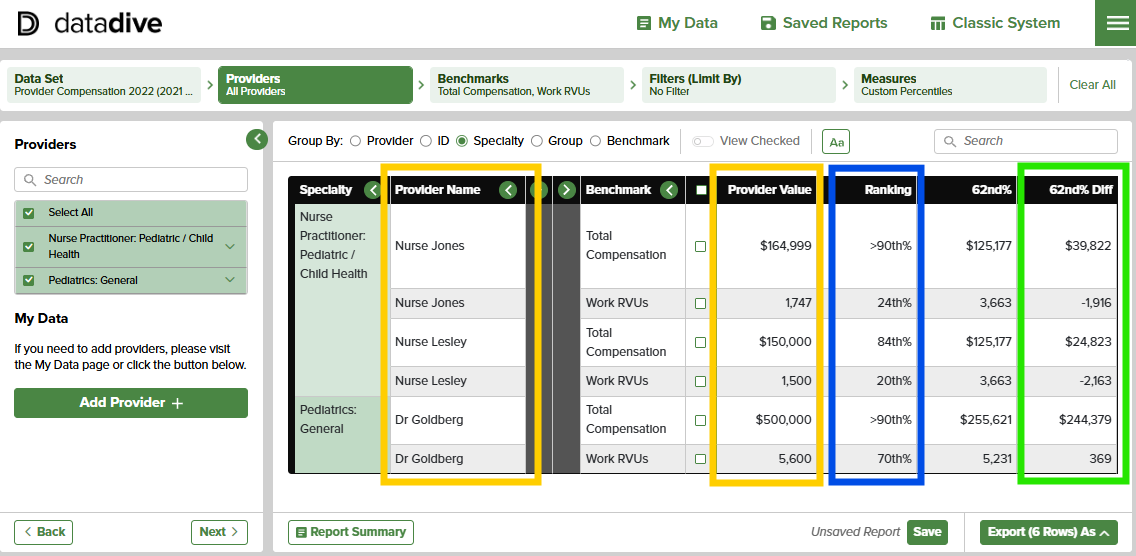
Screenshot: Provider Report Card with “ranking” and “difference” displayed
DataDive Tools: My Data Builder, Provider Report Card, Pay to Production Plotter
For data support, email surveys@mgma.com. To add the Provider Report Card to your DataDive account, contact sales@mgma.com.
Recent Data Set Releases
Provider Compensation 2026
Total compensation, productivity and compensation-to-productivity ratios across physicians and advanced practice providers.
Academic Compensation 2026
Compensation and productivity, both normalized per billable clinical time and actual output, for providers employed in teaching institutions.
Medical Directorship Compensation 2026
Annual pay, monthly stipend, hourly rate and directorship hours data specifically for medical directors.
On-Call Compensation 2026
Annual, monthly, weekly, daily and hourly on-call rates, including weekend and holiday, for physicians and advanced practice providers.
Provider Placement Starting Salary 2026
Guaranteed compensation and starting benefits for first-year providers new to their specialty, or experienced and new to a practice.
Procedural Profile 2026
Physician and advanced practice provider coding profiles for professional services billed across all payers.
Helpful Tools

User Guide
Follow this visual guide to seamlessly navigate extensive benchmarking data. Our team routinely updates this document with any new functionality or feature of the platform, keeping useful information at your fingertips.

Training Video
Dive into the platform with an MGMA Data Specialist, as she navigates the how-to of finding your favorite features and showcases everything new and improved.

Data Set Resources
Get the most out of your DataDive access. Find data set capability overviews, a benchmarks and filter guide, data set launch dates and more.
Need Help?
Our expert data team is here to help, M-F, 8:00 am to 5:00 pm MT. Call toll-free at 877.275.6462, ext. 1895, or email survey@mgma.com.
Explore Related Content


More DataDives


